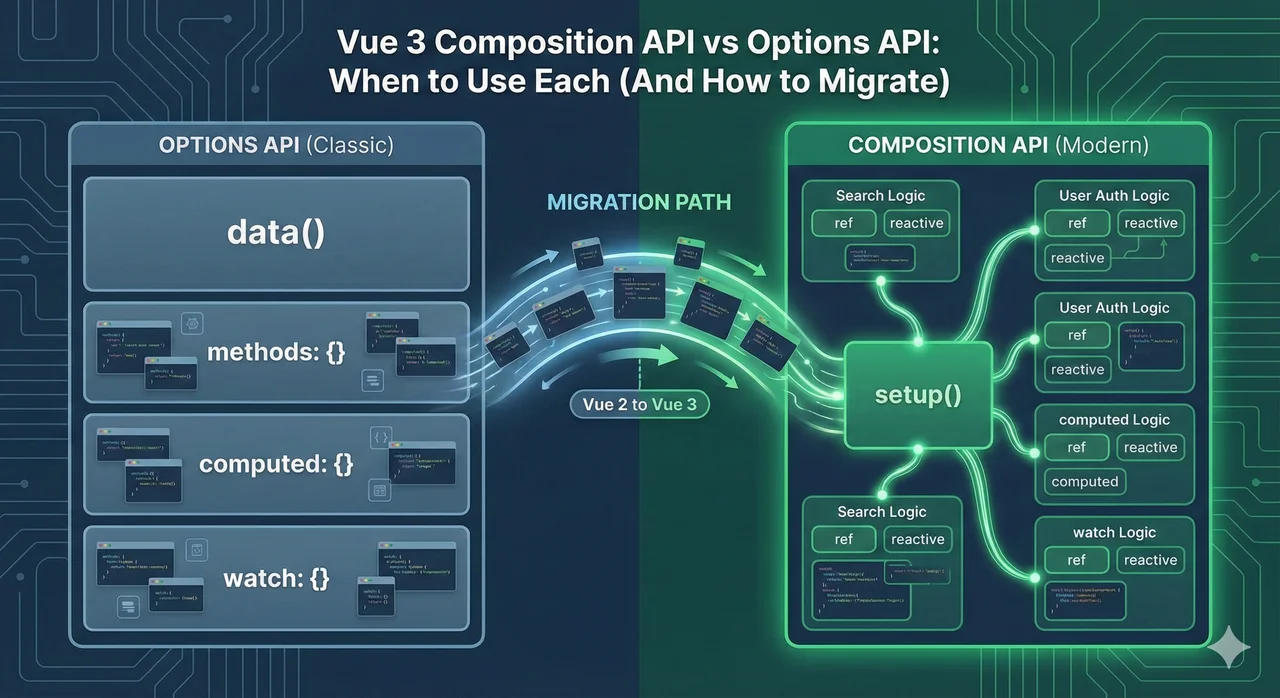
When Vue 3 launched, the Composition API was its most significant and controversial addition. Some developers loved the new flexibility. Others worried it would make Vue feel like React. Three years later, the dust has settled, and we have a clear picture of when each API shines.
The good news: Both APIs are fully supported in Vue 3. You can even mix them in the same project. This guide helps you make informed decisions about which to use—and when. If you're planning a full migration, check out our complete Vue 2 to Vue 3 migration roadmap.
The Quick Answer: Which Should You Use?
Use Options API When...
- → Building simple components
- → Your team is new to Vue
- → Migrating from Vue 2 incrementally
- → The component has clear, separate concerns
Use Composition API When...
- → Building complex components
- → You need to share logic between components
- → Using TypeScript
- → Starting a new Vue 3 project
Our Recommendation for New Projects
For new Vue 3 projects, we recommend defaulting to Composition API with <script setup>. It's more concise, has better TypeScript support, and is where the Vue ecosystem is heading. But don't force it—Options API is still valid for simple components or teams learning Vue.
Understanding the Core Difference
The fundamental difference is how you organize your code. Options API organizes by option type (data, methods, computed). Composition API organizes by logical concern.
Same Component, Two Approaches
Let's build a simple counter with a doubled value:
Options API
<script>
export default {
  data() {
    return {
      count: 0
    }
  },
  computed: {
    doubled() {
      return this.count * 2
    }
  },
  methods: {
    increment() {
      this.count++
    }
  }
}
</script>

<template>
  <button @click="increment">
    Count: {{ count }} ({{ doubled }})
  </button>
</template>
Composition API
<script setup>
import { ref, computed } from 'vue'

const count = ref(0)
const doubled = computed(() => count.value * 2)

function increment() {
  count.value++
}
</script>

<template>
  <button @click="increment">
    Count: {{ count }} ({{ doubled }})
  </button>
</template>
For simple components like this, both approaches work equally well. The real differences emerge in complex components.
Options API: The Familiar Approach
If you've used Vue 2, you already know the Options API. It organizes components into predefined sections: data, computed, methods, watch, and lifecycle hooks.
Advantages of Options API
Beginner-Friendly Structure
Clear sections make it easy to know where code goes. New developers can contribute faster.
No Import Boilerplate
No need to import ref, computed, etc. Everything works through this.
Vast Ecosystem of Examples
Most tutorials, Stack Overflow answers, and existing codebases use Options API.
Easy Vue 2 Migration
Vue 2 components work in Vue 3 with minimal changes when using Options API.
Limitations of Options API
Logic Fragmentation in Complex Components
Related code gets scattered across data, computed, methods, and watchers. You jump around the file constantly.
Mixins Have Major Drawbacks
The only way to share logic is mixins, which cause naming conflicts and unclear data sources.
Weaker TypeScript Support
this context is hard to type. You need defineComponent and extra workarounds.
Composition API: The Flexible Approach
The Composition API lets you organize code by logical concern rather than option type. Related code stays together. You can extract and reuse logic easily with "composables."
Advantages of Composition API
Better Code Organization
Group related state, computed values, and functions together. No more jumping between sections.
Composables Replace Mixins
Extract logic into reusable functions with clear inputs and outputs. No naming conflicts.
First-Class TypeScript Support
Everything is typed automatically. No this context issues.
Better Tree-Shaking
Only import what you use. Smaller production bundles.
Challenges of Composition API
Learning Curve
Understanding ref vs reactive, .value unwrapping, and reactivity takes time.
More Freedom = More Rope
Without enforced structure, teams need discipline to keep code organized.
Import Overhead
You need to import ref, computed, watch, etc. (Auto-imports can help.)
Where Composition API Really Shines: Complex Components
The true value of Composition API emerges in complex components with multiple concerns. Let's look at a realistic example: a user profile editor with form handling, validation, and API calls.
Options API: The Scattered Code Problem
<script>
export default {
  data() {
    return {
      // User data
      user: null,
      userLoading: false,
      userError: null,

      // Form data
      formData: { name: '', email: '' },
      formDirty: false,

      // Validation
      errors: {},
      isValid: false
    }
  },

  computed: {
    // User computed
    fullName() { return `${this.user?.firstName} ${this.user?.lastName}` },

    // Form computed
    hasChanges() { return JSON.stringify(this.formData) !== JSON.stringify(this.originalData) },

    // Validation computed
    canSubmit() { return this.isValid && this.hasChanges && !this.userLoading }
  },

  methods: {
    // User methods
    async fetchUser() { /* ... */ },

    // Form methods
    updateField(field, value) { /* ... */ },
    resetForm() { /* ... */ },

    // Validation methods
    validateField(field) { /* ... */ },
    validateAll() { /* ... */ },

    // Submit
    async submitForm() { /* ... */ }
  },

  watch: {
    // Watch for user changes
    user(newUser) { /* ... */ },

    // Watch for form validation
    formData: { deep: true, handler() { /* ... */ } }
  },

  mounted() {
    this.fetchUser()
  }
}
</script>
Notice how user logic, form logic, and validation logic are scattered across data, computed, methods, and watch. To understand the form feature, you need to jump to 4 different places.
Composition API: Organized by Feature
<script setup>
import { ref, computed, watch, onMounted } from 'vue'

// ========== User Feature ==========
const user = ref(null)
const userLoading = ref(false)
const userError = ref(null)

const fullName = computed(() =>
  `${user.value?.firstName} ${user.value?.lastName}`
)

async function fetchUser() {
  userLoading.value = true
  try {
    user.value = await api.getUser()
  } catch (e) {
    userError.value = e.message
  } finally {
    userLoading.value = false
  }
}

// ========== Form Feature ==========
const formData = ref({ name: '', email: '' })
const originalData = ref(null)

const hasChanges = computed(() =>
  JSON.stringify(formData.value) !== JSON.stringify(originalData.value)
)

function updateField(field, value) {
  formData.value[field] = value
}

function resetForm() {
  formData.value = { ...originalData.value }
}

// ========== Validation Feature ==========
const errors = ref({})

const isValid = computed(() => Object.keys(errors.value).length === 0)
const canSubmit = computed(() => isValid.value && hasChanges.value && !userLoading.value)

function validateField(field) {
  // validation logic
}

watch(formData, () => validateAll(), { deep: true })

// ========== Submit ==========
async function submitForm() {
  if (!canSubmit.value) return
  // submit logic
}

onMounted(fetchUser)
</script>
All user-related code is together. All form code is together. All validation code is together. You can even extract each section into a composable.
Composables: The Killer Feature
Composables are reusable functions that encapsulate reactive state and logic. They're the Composition API's answer to mixins—but better in every way.
Example: A Reusable Form Composable
// composables/useForm.ts
import { ref, computed, watch } from 'vue'

export function useForm<T extends Record<string, any>>(initialData: T) {
  const data = ref({ ...initialData }) as Ref<T>
  const originalData = ref({ ...initialData }) as Ref<T>
  const errors = ref<Record<string, string>>({})
  const isDirty = ref(false)

  const isValid = computed(() => Object.keys(errors.value).length === 0)

  const hasChanges = computed(() =>
    JSON.stringify(data.value) !== JSON.stringify(originalData.value)
  )

  function setField<K extends keyof T>(field: K, value: T[K]) {
    data.value[field] = value
    isDirty.value = true
  }

  function setError(field: string, message: string) {
    errors.value[field] = message
  }

  function clearError(field: string) {
    delete errors.value[field]
  }

  function reset() {
    data.value = { ...originalData.value }
    errors.value = {}
    isDirty.value = false
  }

  function setOriginal(newData: T) {
    originalData.value = { ...newData }
    data.value = { ...newData }
    isDirty.value = false
  }

  return {
    data,
    errors,
    isDirty,
    isValid,
    hasChanges,
    setField,
    setError,
    clearError,
    reset,
    setOriginal
  }
}
Using the Composable
<script setup>
import { useForm } from '@/composables/useForm'
import { useUser } from '@/composables/useUser'

// Clean, declarative setup
const { user, loading, fetchUser } = useUser()
const { data, errors, isValid, hasChanges, setField, reset } = useForm({
  name: '',
  email: ''
})

// Watch user changes and update form
watch(user, (newUser) => {
  if (newUser) {
    setOriginal({ name: newUser.name, email: newUser.email })
  }
})
</script>
Mixins (Options API)
- × Unclear where properties come from
- × Name collisions between mixins
- × Hard to pass parameters
- × TypeScript struggles with typing
Composables (Composition API)
- ✓ Explicit imports—you see what you're using
- ✓ Rename on import to avoid collisions
- ✓ Pass any parameters you need
- ✓ Full TypeScript inference
<script setup>: The Best of Both Worlds
<script setup> is a compile-time syntactic sugar that makes Composition API even more concise. It's the recommended syntax for new Vue 3 projects.
Comparison: setup() vs <script setup>
setup() function
<script>
import { ref, computed } from 'vue'

export default {
  props: {
    initialCount: Number
  },
  emits: ['update'],
  setup(props, { emit }) {
    const count = ref(props.initialCount)
    const doubled = computed(() => count.value * 2)

    function increment() {
      count.value++
      emit('update', count.value)
    }

    // Must return everything used in template
    return {
      count,
      doubled,
      increment
    }
  }
}
</script>
<script setup>
<script setup>
import { ref, computed } from 'vue'

const props = defineProps<{
  initialCount: number
}>()

const emit = defineEmits<{
  update: [value: number]
}>()

const count = ref(props.initialCount)
const doubled = computed(() => count.value * 2)

function increment() {
  count.value++
  emit('update', count.value)
}

// No return needed - everything is auto-exposed
</script>
Benefits of <script setup>:
- • Less boilerplate—no export default, no return
- • Better TypeScript integration with defineProps/defineEmits
- • Better runtime performance (compiled to more efficient code)
- • Variables are automatically available in template
TypeScript: A Clear Winner
If you're using TypeScript—or planning to—Composition API is the clear choice. The difference in developer experience is significant.
Options API + TypeScript
<script lang="ts">
import { defineComponent, PropType } from 'vue'

interface User {
  id: number
  name: string
}

export default defineComponent({
  props: {
    user: {
      type: Object as PropType<User>,
      required: true
    }
  },
  data() {
    return {
      count: 0 // Type inferred
    }
  },
  computed: {
    // Need explicit return type sometimes
    greeting(): string {
      return `Hello, ${this.user.name}`
    }
  },
  methods: {
    // 'this' can be tricky to type
    increment() {
      this.count++ // Sometimes TS struggles here
    }
  }
})
</script>
Composition API + TypeScript
<script setup lang="ts">
interface User {
  id: number
  name: string
}

const props = defineProps<{
  user: User
}>()

// Type inference just works
const count = ref(0)

// Computed types are inferred
const greeting = computed(() =>
  `Hello, ${props.user.name}`
)

// No 'this' context issues
function increment() {
  count.value++
}
</script>
Decision Framework: Which API for Your Project?
Answer These Questions:
1. Are you starting a new project or migrating from Vue 2?
New project
→ Use Composition API with <script setup>
Vue 2 migration
→ Start with Options API, migrate gradually
2. What's your team's Vue experience level?
New to Vue
→ Options API for initial learning, then Composition
Experienced
→ Composition API for better code organization
3. Are you using TypeScript?
Yes
→ Strongly prefer Composition API
No
→ Either works well
4. How complex are your components?
Simple, self-contained
→ Options API is fine
Complex, shared logic
→ Composition API with composables
Can You Mix Both APIs?
Yes! You can use both APIs in the same project, and even in the same component (though that's rarely necessary). This is useful during gradual migration.
Using Composables in Options API
<script>
import { useMousePosition } from '@/composables/useMousePosition'

export default {
  // Options API component using a Composition API composable
  setup() {
    const { x, y } = useMousePosition()
    return { x, y }
  },
  data() {
    return {
      count: 0
    }
  },
  methods: {
    increment() {
      this.count++
    }
  }
}
</script>
This is a great migration strategy: start adopting composables in existing Options API components before fully converting them.
Need Help with Your Vue 3 Migration?
Whether you're adopting Composition API, migrating from Vue 2, or converting your entire codebase—we've done it dozens of times. Get a comprehensive audit and fixed-price quote for your project.
✓ Fixed-price guarantee ✓ Includes Composition API conversion ✓ 7-day turnaround
Conclusion
The Composition API vs Options API debate doesn't have to be all-or-nothing. For new Vue 3 projects, we recommend defaulting to Composition API with <script setup>—it's more flexible, has better TypeScript support, and scales better with complex components.
But Options API isn't going away. It's still fully supported, easier for beginners, and works great for simple components. If you're migrating from Vue 2, using Options API initially makes the transition smoother.
The key is understanding the tradeoffs and choosing based on your project's needs—not dogma. And remember: you can always adopt Composition API incrementally, one component at a time.